01
Real scoreboard data
Bring supported game clock, shot clock, score and period values into your broadcast workflow.
Receive clocks and scores from a compatible pool scoreboard, then bring them into Lob Shot Live on iPhone or Magic Clock Bridge on Mac.
Independent product. Lob Shot Live, Magic Key and Magic Clock Bridge are independent Lob Shot products. Neither Lob Shot nor these products are affiliated with, endorsed, sponsored, supported or approved by Colorado Time Systems.
Tell us your pool location and scoreboard model, if known.
Confirm compatibility with your installation before relying on this product. Current compatibility does not guarantee future compatibility. Support for a particular system may be discontinued if changes make integration impractical.
Receiver illustration · enclosure may vary
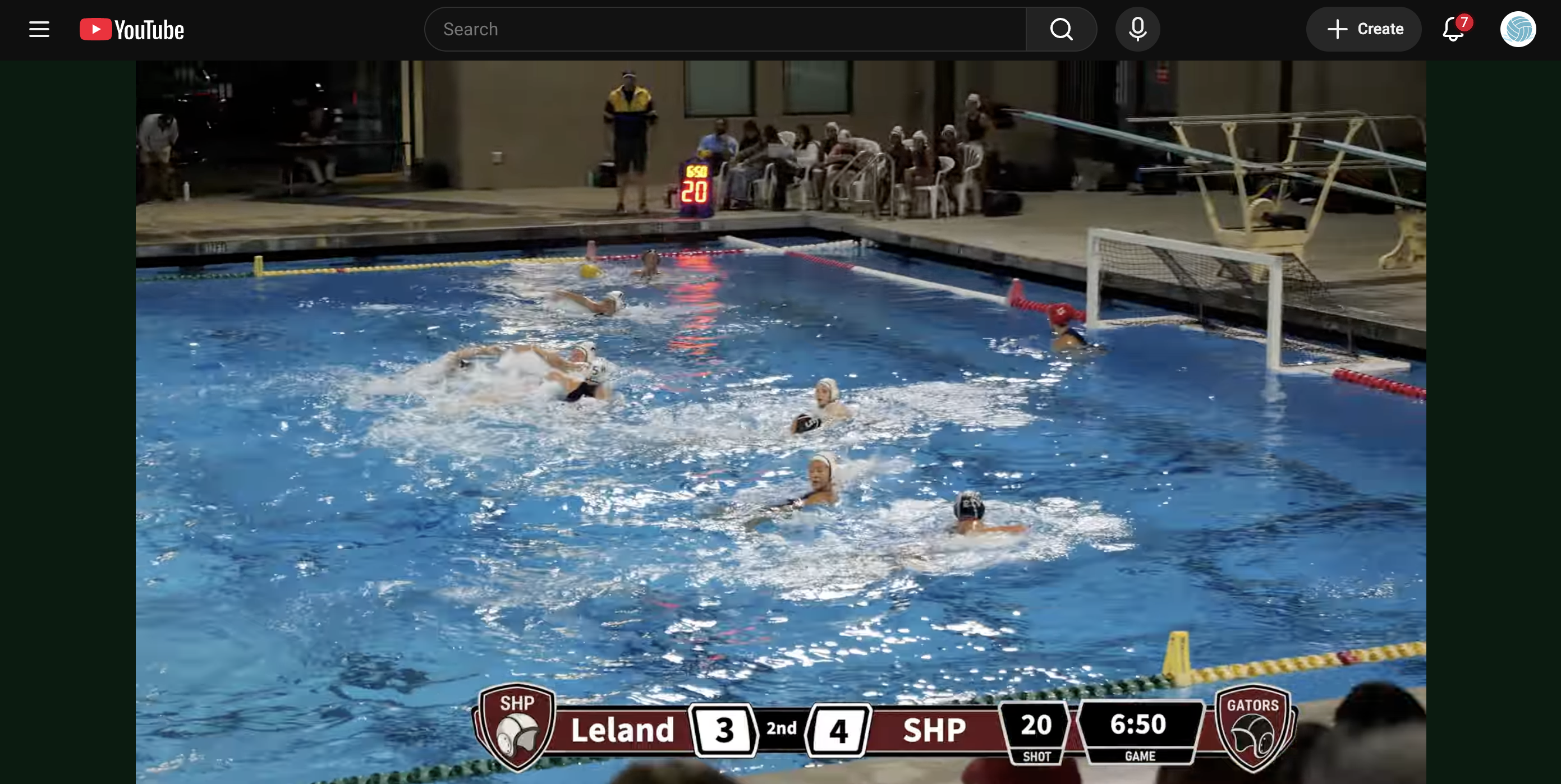
A real broadcast powered by Magic Key. The game clock and shot clock in the overlay match the display on deck: 6:50 and 20 seconds.
Magic Key receives supported Colorado Time System wireless scoreboard packets and passes them to your app. It is a receiver, not a scoreboard controller.
Bring supported game clock, shot clock, score and period values into your broadcast workflow.
Use Bluetooth with Lob Shot Live or Magic Clock Bridge. The Mac Bridge also supports receivers configured for USB.
Current Bluetooth receiver firmware blinks blue when receiving supported data. USB receiver firmware uses green for receive activity.
Connect your Bluetooth receiver to one app at a time. Select the scoreboard and confirm the received values against the pool display before the game.
Use Magic Clock in the app to put supported pool clocks and scores into the on-screen scorebug while filming.
Explore Lob Shot Live →Receive data over Bluetooth or USB, write OBS text files, and save a structured scoreboard timeline.
Explore the Mac Bridge →Requires Magic Key and a compatible Colorado Time System wireless scoreboard. Support varies by model, installation and pool locations.
Compatibility can change. Operation depends on the scoreboard model, configuration, installation, radio conditions and transmitted data. Changes to Colorado Time Systems hardware, firmware, software, wireless protocols or system configuration may reduce or eliminate compatibility, including at installations that previously worked. Continued compatibility is not guaranteed, and Lob Shot cannot guarantee that an update will restore it.
Scores and clocks are for broadcast and informational use only, not official timing, scoring, officiating or safety decisions. Data may be delayed, inaccurate, incomplete or unavailable. Check received values against the official display.
Use only with permission and where permitted by law and venue policies. Availability of a wireless signal does not itself establish permission to receive, use or redistribute it. Read the compatibility terms.
No. A Colorado Time System display alone does not establish compatibility. The wireless system, transmitted packet format, installation and reception conditions all matter. Contact us with the pool and scoreboard details.
No. Production Magic Key firmware receives Colorado Time System radio data and relays it to the app. It does not send scoreboard control commands.
On current Bluetooth firmware it indicates received supported data, rather than simply a Bluetooth connection. Always confirm the selected clock and actual values in the app.
Keep Magic Key, its connections and power supply dry and protected from splashes, excessive heat and physical damage. Follow the supplied power and handling instructions. Do not assume an enclosure is waterproof or suitable for immersion.
Email us about compatibility and availability. Include your pool location, scoreboard model if known, and whether you plan to use iPhone or Mac.
Tell us where you broadcast. We’ll help you check compatibility and discuss receiver availability.
Contact Lob Shot ↗Confirm compatibility with your installation before relying on this product. Current compatibility does not guarantee future compatibility. Support for a particular system may be discontinued if changes make integration impractical.